Who this guide is for: GX470 (2003–2009) and GX460 (2010–2023) owners, DIY beginner to intermediate, thinking about swapping the factory head unit for an Android-powered unit from Teyes, Joying, Dasaita, Mekede, Atoto, or similar brands. GX550 owners: see the note below. This guide is mostly not for you.
Why GX owners do this swap: The factory head units in the 470 and 460 are ancient by modern standards. An Android head unit gives you wireless Apple CarPlay and Android Auto, Google Maps/Waze on a big touchscreen, a backup camera display, OBD-II apps like Torque, and Spotify without an adapter. DIY installed cost is typically a few hundred dollars. A fraction of a name-brand Kenwood/Alpine/Pioneer setup with a Maestro interface.
The trade-off: these units come from Chinese manufacturers with inconsistent documentation and mixed customer support, plus GX-specific quirks you’ll need to work around. This guide walks you through all of it.
If You Have a GX550: Read This First, Then Move On
The GX550 shipped with a modern system that already includes wireless Apple CarPlay and Android Auto. There’s little to gain by replacing it. The Android-head-unit world is a GX470/GX460 project. 550 owners wanting more (offline trail maps, OBD data on screen) are better served by a tablet mount than a head-unit swap.
The Single Most Important Question: Does Your Truck Have Factory Nav?
Before you order anything, figure out whether your GX has factory navigation. It changes the entire job.
How to tell: On the GX470, nav-equipped trucks have the climate controls integrated into the factory head unit’s touchscreen; non-nav 470s have a separate physical climate panel with buttons and knobs below a simpler radio. On the GX460, nav trucks have the larger screen with climate, vehicle settings, and audio integrated; non-nav trucks (mostly early 2010–2013 base models, and they’re rare) have a smaller screen and more separate controls.
Why it matters so much: The factory nav units are deeply integrated with the truck. The GX470’s nav computer lives under the passenger seat (it’s the box with the DVD slot for the navigation disc). Critically, the factory navigation system’s voice audio routes through the front driver-side speaker wiring via the nav ECU. On nav trucks, the climate controls are gone the moment the factory head unit comes out. This is the hard problem of the whole swap.
Decision Guide: Which GX Is Which
- If you have a non-nav GX470: The easiest version of this job. Your climate controls are a separate physical panel that stays put. The swap is essentially a standard Android head unit install: pull the dash trim, connect the vehicle-specific harness adapter, and bolt in the unit with the included dash kit.
- If you have a nav-equipped GX470: Still doable, but you must solve the climate-control problem first. Options: (a) an Android unit that explicitly advertises integrated HVAC control for the GX470 with the right CAN bus decoder. Verify this specifically before ordering; (b) convert to the non-nav OEM climate control panel (the “nav to non-nav conversion” documented on IH8MUD. A project involving a used 2006–2009 non-nav panel and harness work); or (c) accept losing on-screen climate control. Do not order a unit until you know your answer.
- If you have a GX460 with nav: “Tablet screen conversion kits” built for the 460 exist and advertise plug-in compatibility plus retained climate display via CAN bus. They usually keep the factory amplifier and speakers. Note some kits are designed for the Toyota Prado (the GX’s sibling) and the harness may need minor modification. Check owner threads for your model year before buying.
- If you have a non-nav GX460: Rare trucks, and the one-piece center stack plastic makes custom fitment harder. Doable, but expect more dash-kit fiddling.
- A middle path: the Grom VLine2 add-on. If you want Android Auto and Apple CarPlay but want to keep the factory head unit and its climate integration, the Grom VLine2 is a plug and play add-on for nav models. It replaces the CD changer in the glove box and feeds video and audio through the factory screen via the CD input. You keep the factory screen resolution, which is dated, but everything else stays factory. Owner reported cost is around $800.
Install Overview
Tools you’ll generally need: trim removal tools, a Phillips screwdriver, a socket set, electrical tape or heat shrink, and a multimeter for verifying power wires. A phone with a decent camera for photos of every connector before you unplug it.
1. Dash Disassembly
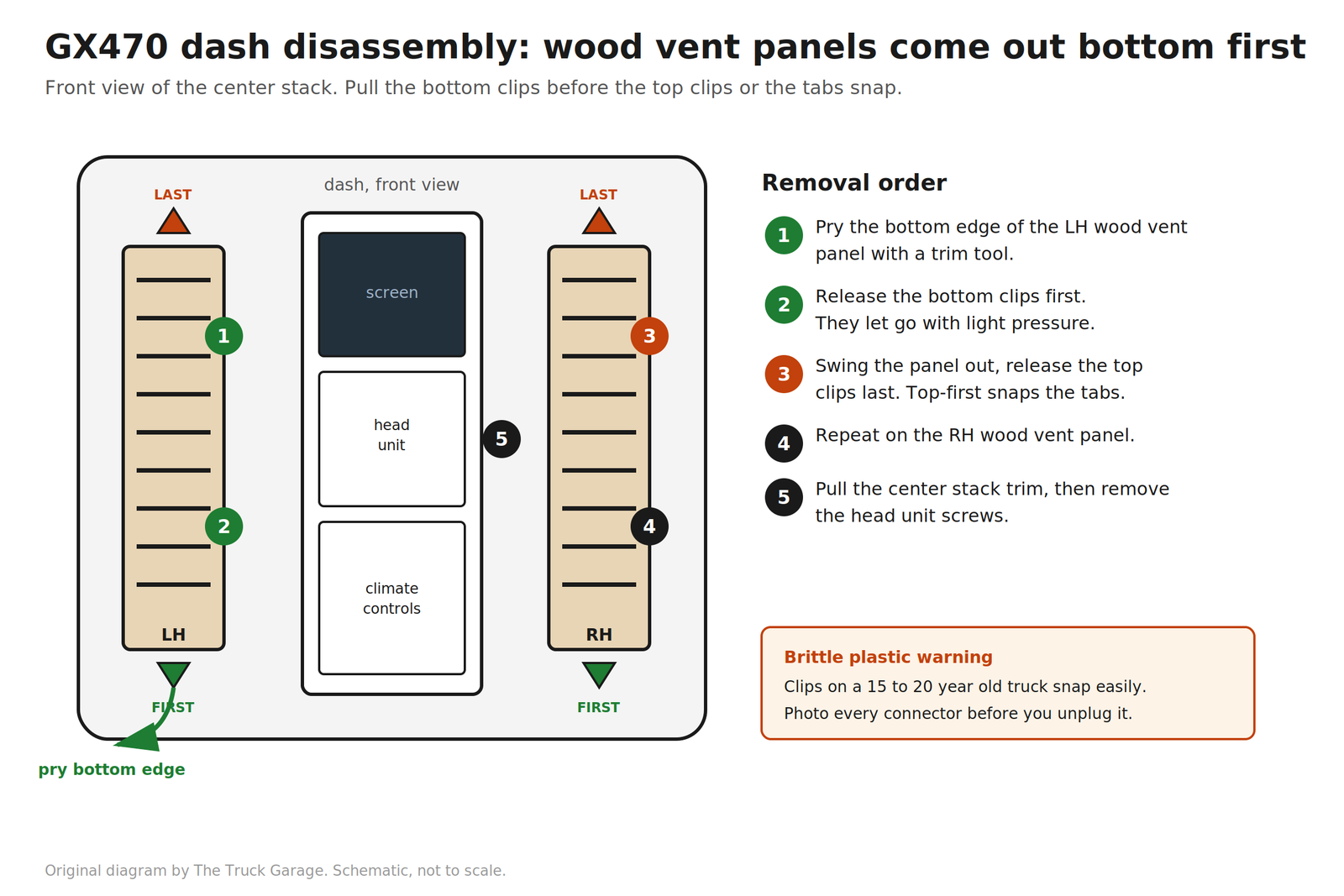
Both the 470 and 460 center stacks come apart with trim tools and a handful of screws. No specialty tools required. Work slowly around the dash kit pieces. The plastic clips on a 15 to 20 year old truck are brittle. Take a photo of every connector before you unplug it, and label them with masking tape. You will thank yourself at 11 p.m.
On the GX470, the wood vent panels to the left and right of the center stack come out bottom first. Pull the bottom clips before the top clips or you will break the tabs. If you do break a wood side panel, silver Sport or Prado panels are available cheaply compared to OEM wood matched trim.
2. Harness Adapters
Do not cut the factory harness. Buy a kit with a vehicle-specific harness adapter that plugs into the factory connectors. If your kit didn’t include one, source one before you start. Connect the adapter to the head unit’s harness on the bench first, per the unit’s wiring diagram, then carry the assembly to the truck as one piece.
3. The CAN Bus Decoder
This small box translates between the truck’s CAN bus and the Android unit. It’s responsible for steering-wheel controls, reverse-camera triggering, door-open displays, and (on supporting units) climate-control info on screen. If steering-wheel controls don’t work after install, the CAN bus decoder settings in the head unit’s factory settings menu are the first place to look. The unit needs the right vehicle protocol selected.
What to Do With the Factory Nav Hardware
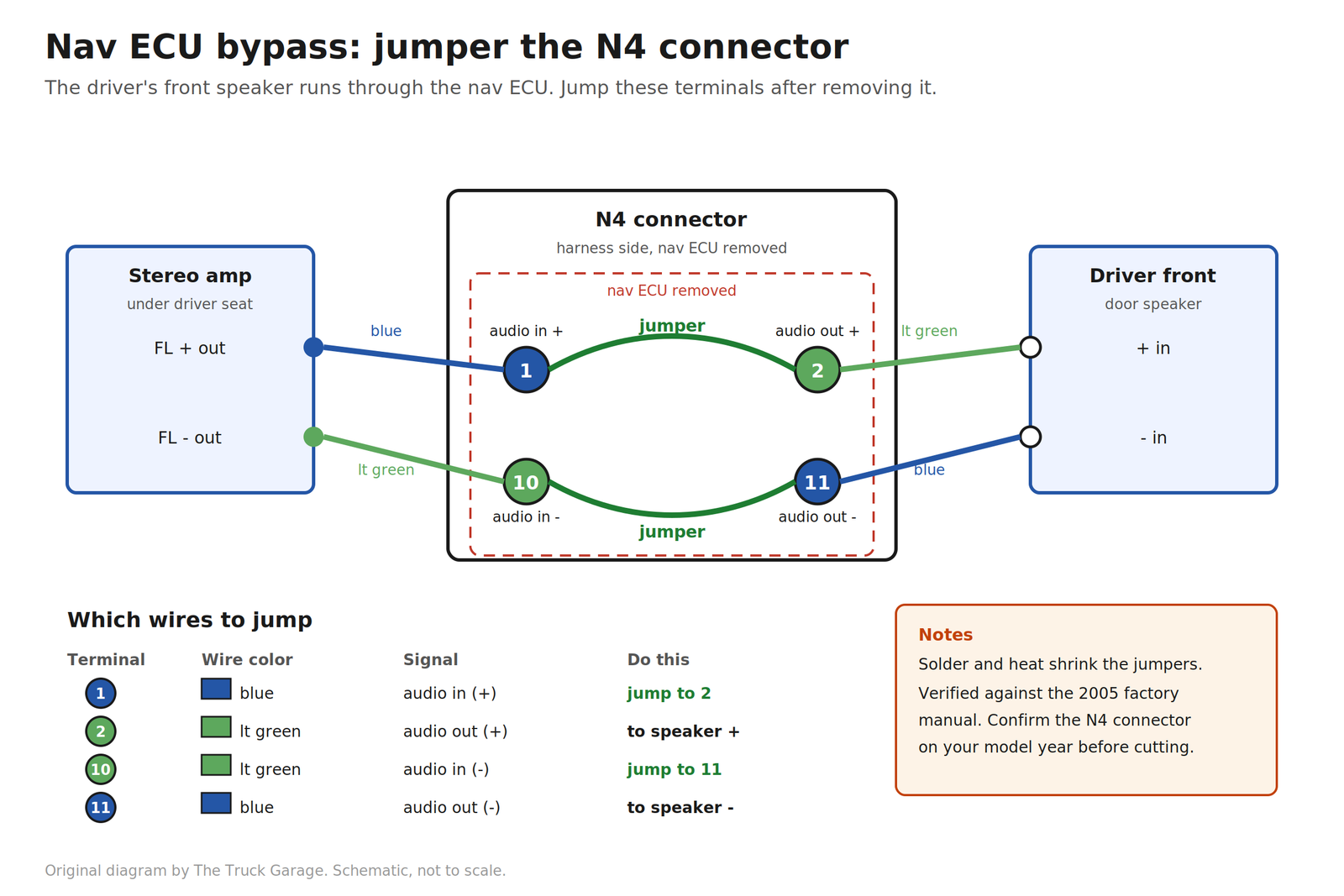
GX470 owners: After the swap, the navigation ECU under the passenger seat is dead weight. But it’s not entirely inert. On nav-equipped trucks the driver’s front door speaker is wired through that box. The stereo amplifier sends the front-left channel into the nav ECU, which mixes in the navigation voice prompts and sends the result back out to the speaker. Remove or unplug the ECU and the driver’s front speaker goes silent. (Note: it is only the driver’s front speaker. The passenger front speaker is wired straight from the amplifier.)
The fix is a jumper on the harness side of the nav ECU’s N4 connector, verified against the 2005 factory manual wiring diagrams:
- Terminal 1 (blue wire, audio in +) jumps to terminal 2 (light green wire, audio out +)
- Terminal 10 (light green wire, audio in -) jumps to terminal 11 (blue wire, audio out -)
That reconnects the amplifier’s front-left output straight to the driver’s door speaker, bypassing the removed box. Solder and heat shrink the jumpers, or use quality crimp connectors. This is verified for 2005. Wire colors are expected to be the same across the 2003 to 2009 generation, but the connector designation can vary by year, so confirm the terminals against the factory manual wiring diagrams for your specific model year before cutting anything. Test every speaker before buttoning up.
- Alternatively, leave the nav ECU physically in place under the seat and plugged in. It costs nothing but a little under-seat space, and avoids touching speaker wiring. Note that unplugging it is not the same as leaving it alone. An unplugged ECU breaks the front-left speaker path exactly like removing it does, so if the box stays, the connector stays plugged in.
Know where the boxes are before you start unplugging things: on the 470, the nav computer is under the passenger seat (front RH seat), the factory stereo amplifier is under the driver’s seat (front LH seat), and the television camera controller is behind the glove box on the passenger side of the dash. That box is the brains for the rearview camera. If you are retaining the OEM camera, leave it alone. If you are going with an aftermarket camera, you do not need it. Don’t unplug the wrong box while you’re fishing around under the seats.
GX460 owners: The integration is more dashboard-level than separate boxes under seats. The factory amplifier is part of the audio chain the Android kit is designed to work with. Leave it in place unless you’re doing a full aftermarket audio rebuild.
Retaining Steering-Wheel Controls
This works, but it’s the most common thing people fail to configure correctly. The path:
- Make sure the CAN bus decoder is connected and the head unit’s vehicle settings match your truck (some units list specific Lexus/Toyota CAN profiles).
- Most Android units have a steering-wheel-control “learning” screen in settings: press a button on the wheel, then assign it a function. Walk through every button. Volume, track, mode, phone.
- If controls partially work (volume works, track doesn’t), it’s almost always the CAN profile selection, not the wiring. Try the alternate Lexus/Toyota profiles before pulling the dash apart again.
Retaining the Factory Backup Camera
Do not touch the power going to the factory camera. Leave the camera power wiring exactly as it is. To retain the OEM camera:
- Use an RCA male pigtail and splice into the factory composite video positive and negative wires.
- Plug the male RCA into the head unit’s yellow female RCA reverse camera video input (the dedicated camera input, not a generic video-in).
- The head unit’s reverse trigger wire is looking for 12V+. Connect it to a reverse light bulb wire so the head unit switches to the camera view when you shift into reverse.
Honest assessment: the OEM camera is low resolution by modern standards, but it is more than enough for basic duty. You do not gain anything with a 1080p signal on a tiny display screen. Many owners retain the OEM camera for the factory fit. One practical warning: removing the factory camera requires pulling exterior tailgate trim with fragile tabs. Owners recommend leaving the OEM camera in place and mounting an aftermarket camera nearby instead of fighting the trim.
Common Pitfalls
Battery drain. This is mostly a non-issue. Owner experience: a GX parked for two weeks started right up with an Android head unit installed. If you get a dead battery after the install, your battery was most likely weak to begin with. Android units do drop into a standby sleep mode rather than fully powering off, so if your truck sits for long stretches, check the unit’s sleep timer settings and consider a battery tender. For normal use, do not lose sleep over this.
Amplifier turn-on issues (no sound after install). The factory amplifier needs a turn-on signal from the head unit. If you finish the install and get no audio, the amp turn-on wire (typically the blue wire on the head unit harness) is the prime suspect. Verify it is connected to the corresponding wire on the vehicle-side adapter. One more trick: after verifying the blue wire is connected properly, swap the OEM radio back in, turn it on, set the volume to about 75 to 80 percent of max, then turn off the vehicle and swap the aftermarket head unit back in. A related variant: sound from some speakers but not others, which on a nav 470 points back to the nav-ECU speaker routing described above.
Front to rear fade with the factory amp. The factory amp only takes left and right input. It does not discern between front and rear. That is handled by the factory amp’s internal DSP. So if you lose front to rear fade control with the aftermarket radio, that is how it is supposed to work. If you prefer a front or rear bias, set it with the factory radio before swapping in the aftermarket unit. The factory amp remembers the setting until the battery is disconnected, which resets its memory.
Climate control integration. Repeating because it’s the #1 regret: on nav-equipped trucks, the factory climate controls live in the head unit you’re removing. If your Android unit doesn’t explicitly support HVAC display/control for your model year via its CAN decoder, you will lose on-screen climate control. Some units advertise an “A/C info display”. Verify with the seller, with photos from an actual GX install, that this means real control and not just a decorative readout. For the GX470, the alternative is the OEM non-nav climate panel conversion, which is a real project in its own right.
If your AC controls do not work with the aftermarket head unit, try this: put the factory equipment back in, turn on the AC with the highest fan setting and the coldest temp setting on both sides. This appears to wake up the HVAC amplifier and ECU. Then swap the aftermarket head unit back in.
Dash kit fitment. Fitment complaints were common with older kits, but with the recent generation of Android radios the fit is essentially perfect. What can still bite you is depth: the wiring bundled behind the unit can prevent it from seating fully, so dress the wires carefully and consider right-angle RCA adapters. Also note the head unit side screw holes do not line up with the factory radio side bracket rails. Double sided tape or drilling new holes in the side bracket rails fixes this if necessary. Test-fit everything loosely before you connect a single wire.
GPS and microphone placement. The included GPS antenna is magnetic. One stealth option that works: double side tape it to the plastic HVAC ducting under the center dash. It is not visible once everything is assembled, and it still gets a signal fine. Route the external mic away from HVAC vents. One clean spot is the gap between the top dash and the instrument panel shroud. It stays hidden and picks up voice well.
Common Mistakes
- Ordering before confirming nav vs. non-nav. This single mistake causes most of the painful installs. Know your truck’s configuration and confirm the kit supports it, with evidence, not just a product title that says “for GX470.” CAN bus decoders are model year specific, and sometimes even manufacture year specific. If in doubt, contact the seller first.
- Cutting the factory harness. There’s no reason to. Harness adapters exist for these trucks. Cut wires are how you turn a Saturday project into a three-weekend electrical archaeology dig.
- Skipping the bench test. Power up the unit on the bench with the harness adapter connected before it goes in the dash. Confirm it boots, the touchscreen works, and, if you can, that steering-wheel controls and the camera input respond. Finding a dead-on-arrival unit after the dash is reassembled is miserable.
- Cutting into the factory camera power wire. Leave the camera power alone. Splice only the factory composite video wires to an RCA pigtail for the head unit’s camera input.
- Reassembling the dash before testing. Test everything. Audio from every speaker, steering-wheel controls, backup camera, Bluetooth, GPS lock, climate display if applicable. With the trim still off. Every installer who’s done this twice will tell you the same thing.
- Tossing the factory head unit. Bag it, label the connectors, and store it. If you ever sell the truck, the next owner may want the factory unit, and having it returns the truck to stock in an afternoon. Same goes for any trim pieces you replaced.
- Assuming the seller’s support will save you. Documentation is often loosely translated and support is in another time zone. Before you buy, find an actual install thread or video for your exact model year (GXOR, IH8MUD, and YouTube all have them) and treat that, plus the unit’s wiring diagram, as your real manual.
FAQ
Will I lose my factory amplifier and subwoofer?
Not necessarily. Most GX-specific kits are designed to work with the factory amp. You keep the amp and speakers and the Android unit acts as the source. If you want aftermarket amps later, the head unit’s RCA pre-outs support that as a second project.
Do steering-wheel controls really work?
Yes, via the CAN bus decoder plus the unit’s button-learning setup. It’s one of the more reliable parts of the install once the right vehicle profile is selected.
Can I keep the factory navigation?
No. The factory nav goes away with the factory head unit. That is the point of the swap: Google Maps, Waze, or offline nav apps on the Android unit replace it, with maps that are actually current.
Will I retain the factory CD changer behind the glove box?
No. Per the GXOR OEM navigation conversion guide, neither the glove box CD changer nor the center console DVD player will work after you replace the factory stereo. Many owners remove the changer and convert the space to a storage cubby.
Will I retain the DVD player function for the back seat display?
No. Same story. The rear ceiling screen goes away with the factory system.
Will the truck throw codes or warning lights?
A head-unit swap alone shouldn’t. If you unplug the nav ECU or amp on a 470, do it with the battery disconnected.
How long does the install take?
For a non-nav truck with a complete kit: a focused afternoon (3 to 5 hours) for a first-timer who takes photos and works carefully. Nav trucks add the climate-control question, which can turn it into a multi-day project if you’re doing the OEM panel conversion. The install itself is simple. But if you have to troubleshoot, who knows. The usual culprits: the wrong harness plugged in (the kit includes extra harnesses you will not use, because one bundle covers every year in a GX generation), the wrong CAN bus decoder shipped by the seller, or the wrong vehicle profile selected in the head unit.
Teyes vs. Joying vs. Dasaita. Which one?
Owner experience: on a 2005 nav truck converted to non-nav, Joying was plug and play and everything worked on the first try, including HVAC and steering wheel controls. For nav trucks, Teyes is the recommended pick. All three, plus Phoenix (based in the USA), offer warranty and user support in English. Warranty and English language support during Western time zones beats buying a randomly named head unit from AliExpress or Temu. As ever, buy the kit with the best GX-specific fitment evidence, not the best spec sheet.
What about software updates and longevity?
Do not update the firmware without first consulting the seller. https://xdaforums.com/ is an excellent resource for firmware questions. Owner experience: a Joying unit ran for over 5 years without a firmware update, rarely froze or needed a reboot, and is instant-on at vehicle start. You can update individual apps (maps, music, OBD tools) through the Play Store, which is where most of the value lives anyway.
Bottom line: on a non-nav GX470, this is one of the best bang-for-buck upgrades you can do. On a nav-equipped 470 or 460, it’s still very doable. But the climate-control question is the whole project, so answer it before you spend a dollar.
Sources
- GXOR OEM Navigation Conversion Guide
- ClubLexus GX470 stereo upgrade discussion
- IH8MUD navigation removal discussion
- XDA Forums
- The factory manual (2005 GX470 wiring diagrams, used to verify the navigation ECU bypass terminals)
Leave a Reply